Securing remote access to servers is one of the most critical tasks for any system administrator or cybersecurity professional. SSH (Secure Shell) remains the de facto standard for remote administration on Linux systems, but it is also a common target for brute force attacks and unauthorized access attempts. By properly monitoring SSH authentication logs and integrating them with Splunk, organizations can gain valuable visibility into authentication activity, detect suspicious behavior, and strengthen their incident response capabilities.
Why SSH Authentication Monitoring Matters
Attackers frequently attempt to gain access to Linux systems using automated scripts that try common usernames and passwords. Even when password authentication is disabled in favor of public/private key authentication, attackers still attempt password-based logins in the hope of finding a misconfigured system. These attempts are recorded by the system’s authentication logs (/var/log/auth.log on Debian/Ubuntu or /var/log/secure on Red Hat-based distributions). Monitoring these logs provides early warning of brute force attempts and helps validate that security configurations are working as intended.
From a compliance and security operations perspective, visibility into successful logins is equally important. Being able to distinguish between legitimate user activity (e.g., an administrator using a trusted SSH key) and unauthorized access attempts allows analysts to triage alerts quickly and accurately.
Syslog vs. Authentication Logs
One common misunderstanding is assuming that all system events, including authentication activity, are stored in /var/log/syslog. While syslog captures general system messages, SSH authentication events are written specifically to the authentication log files. Understanding where these events are stored is the first step toward integrating them into a centralized monitoring solution like Splunk.
Integrating SSH Logs with Splunk
To ingest authentication logs, the Splunk Universal Forwarder can be configured to monitor /var/log/auth.log or /var/log/secure. A sample inputs.conf entry looks like this:
[monitor:///var/log/auth.log]
disabled = false
sourcetype = linux_secure
index = linux
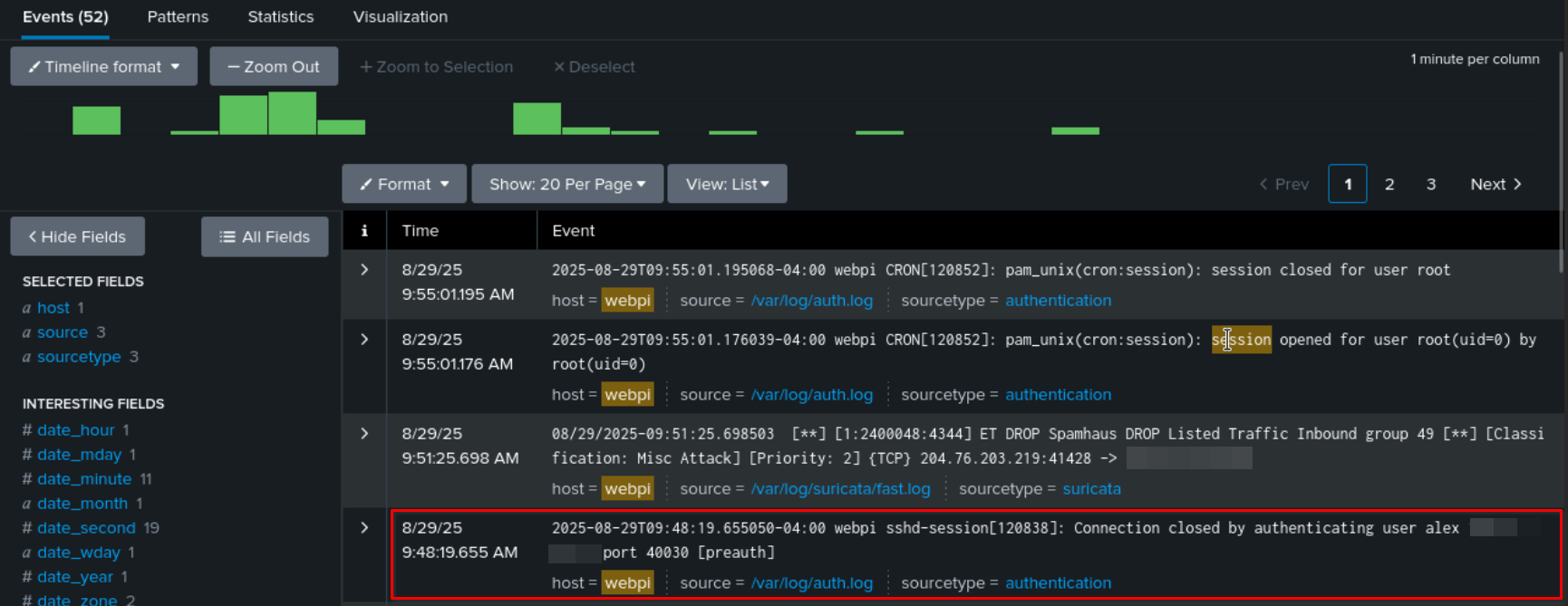
Screenshot showing a failed SSH login attempt by user "alex" in Splunk. The log entry “Connection closed by authenticating user alex” confirms the connection was rejected because a valid key was not provided.
Analyzing Failed Login Attempts
index=linux sourcetype=linux_secure "Failed password"
| rex "Failed password for( invalid user)? (?<username>\S+) from (?<src_ip>\d+\.\d+\.\d+\.\d+)"
| stats count by src_ip, username
| sort - count
This query identifies usernames and IP addresses with the highest number of failed attempts.
Successful Key-Based Logins
index=linux sourcetype=linux_secure "Accepted publickey"
| rex "Accepted publickey for (?<username>\S+) from (?<src_ip>\d+\.\d+\.\d+\.\d+)"
| stats count by src_ip, username
| sort - count
By comparing failed attempts against successful logins, analysts can quickly identify brute force activity or unusual patterns, such as logins from unexpected geographic regions.
From Monitoring to Detection and Response
Monitoring SSH logs is not only about collecting data — it’s about using that data for actionable defense. Security teams can configure Splunk alerts that trigger when multiple failed attempts occur in a short period, suggesting a brute force attempt. Alerts can also be configured to flag successful logins from new or unknown IP addresses.
When paired with broader threat intelligence and anomaly detection, SSH log monitoring becomes a powerful tool in the security operations toolkit. It supports incident response, provides forensic evidence, and contributes to compliance reporting requirements.
Conclusion
SSH remains a vital service in server administration but is also a high-value target for attackers. By collecting and analyzing authentication logs in Splunk, organizations can detect failed password attempts, monitor successful key-based logins, and build proactive alerts for suspicious activity. This approach not only hardens defenses against brute force attacks but also enhances overall situational awareness.
For CySA+ students or anyone learning cybersecurity, regularly monitoring SSH logs is a great way to practice log analysis, detect suspicious activity, and strengthen incident response skills.