One of the most common attack vectors on internet-facing systems is brute-force authentication attempts. Automated scripts probe SSH, FTP, web apps, and other services to guess credentials. Even when accounts use strong passwords, persistent attempts create noise in logs and can consume resources. Fail2ban is a lightweight, host-based mitigation that automatically blocks offending IPs by scanning logs and adding temporary firewall rules. It helps reduce attack surface and allows security teams to focus on more sophisticated threats while automatically mitigating repeated login attempts.
How Fail2ban Works
Fail2ban operates by continuously monitoring selected log files for patterns indicating failed authentication attempts or other malicious activity. When a specific pattern is detected, and the number of occurrences exceeds a defined threshold within a certain time frame, Fail2ban executes a preconfigured action. The most common action is to block the IP address at the firewall level, effectively preventing further attempts for a defined ban period. This automated blocking helps reduce the risk of account compromise while minimizing manual intervention by administrators.
Regex filters >> matches failed authentication patterns using filter files.
Actions >> when thresholds are reached, Fail2ban executes actions such as adding an iptables/nftables rule to block the source IP.
Unbanning >> bans expire after a configurable bantime, automatically reversing the action.
Installation
Fail2ban is available in most distribution repositories and is straightforward to install. It can run on small servers as well as enterprise-grade systems, making it a versatile tool for system administrators and security analysts alike.
Fail2ban configuration is flexible. The main configuration file, /etc/fail2ban/jail.conf, should not be edited directly to avoid conflicts during updates. Instead, administrators create jail.local files or place custom configurations in /etc/fail2ban/jail.d/. These override default settings and allow fine-grained control over individual jails, filters, and actions.
maxretry >> number of failed attempts before banning.
findtime >> time window for counting failures (seconds).
bantime >> ban duration (seconds). Use -1 for permanent bans (use carefully).
Fail2ban also supports email notifications, custom scripts, and integration with external logging systems, giving analysts detailed insight into security events.
Monitoring & Management
Fail2ban includes a command-line client, fail2ban-client, for real-time management of jails and IP bans. Analysts can view the status of each jail, list banned IPs, or unban addresses manually if required. This functionality allows security teams to quickly respond to false positives or adjust rules for high-traffic environments.
sudo fail2ban-client status
sudo fail2ban-client status sshd

# Unban an IP manually
sudo fail2ban-client set sshd unbanip 192.168.1.50
Example: Fail2ban in Action
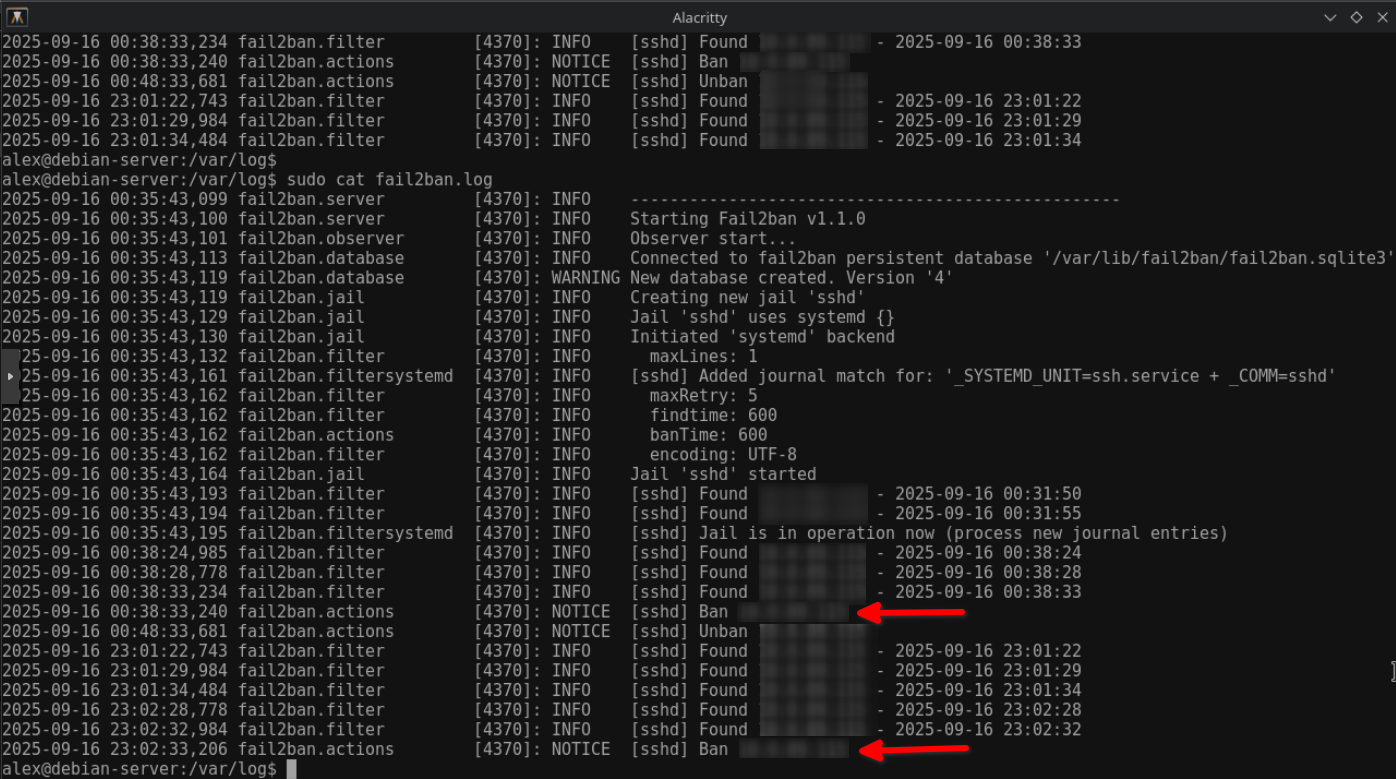
The screenshot below shows an example where Fail2ban detected multiple incorrect password attempts and banned the offending IP address twice:
Fail2ban log indicating repeated bans of an IP after multiple failed SSH login attempts.
Use Cases for CySA+ Candidates
Fail2ban provides practical scenarios for learning security monitoring and incident response skills. Candidates can experiment with log analysis, regex creation, and firewall interaction, gaining hands-on experience with automated threat mitigation. Use cases include:
Reduce brute-force noise: quick mitigation for internet-facing services.
Log analysis practice: craft and test regex filters against sample logs.
Firewall integration: works with iptables, nftables, firewalld, which is good for learning firewall rule management.
Incident response: rapid containment step while investigating persistent attacks.
Conclusion
Fail2ban is an essential tool for securing Linux systems against automated attacks. While it is not a complete security solution on its own, its ease of deployment, low operational overhead, and compatibility with other security tools make it highly valuable. Combining Fail2ban with multi-factor authentication, intrusion detection systems, and centralized logging provides layered defense and enhances incident response capabilities. Security analysts and CySA+ candidates can benefit from learning Fail2ban by experimenting with jails, filters, and custom actions in a safe lab environment, strengthening both defensive skills and operational awareness.
Tip: When deploying at scale, integrate Fail2ban with centralized logging or orchestration so analysts can correlate bans and avoid blocking legitimate distributed services, such as CI/CD runners or VPN egress IPs.